
Add and split sectors
Describe new production inventories, then insert them into the model.
Add
Introduce new productive items and their inputs. Available for IOT and SUT.
Split
Extract a new sector from a parent through constrained disaggregation. Currently IOT only, using the CVXLab model.
Prepare the workbook in two passes#
Use the source IOT
with the companion example files.
1 · Structure
import mario

db = mario.parse_from_excel(
    path="add_sector_iot_table.xlsx", table="IOT", mode="flows",
)
db.get_add_sectors_excel(path="new_sectors.xlsx")
Fill Master with region, new sector, inventory sheet, output unit and parent sector. Optional cluster sheets reuse labels across regions.
2 · Inventories
db.read_add_sectors_excel(path="new_sectors.xlsx", get_inventories=True)
Fill the generated sheets with input coefficients and their native database labels. Use DB units to check units. For splitting, also provide Total outputs, Trades and Tolerances.
3 · Apply
db.read_add_sectors_excel(path="new_sectors.xlsx", read_inventories=True)
expanded = db.add_sectors(inplace=False)
expanded.get_index("Sector")
This inserts the inventories. A split additionally needs the disaggregation step described in the companion notebook.
Workbook examples and sheet layout
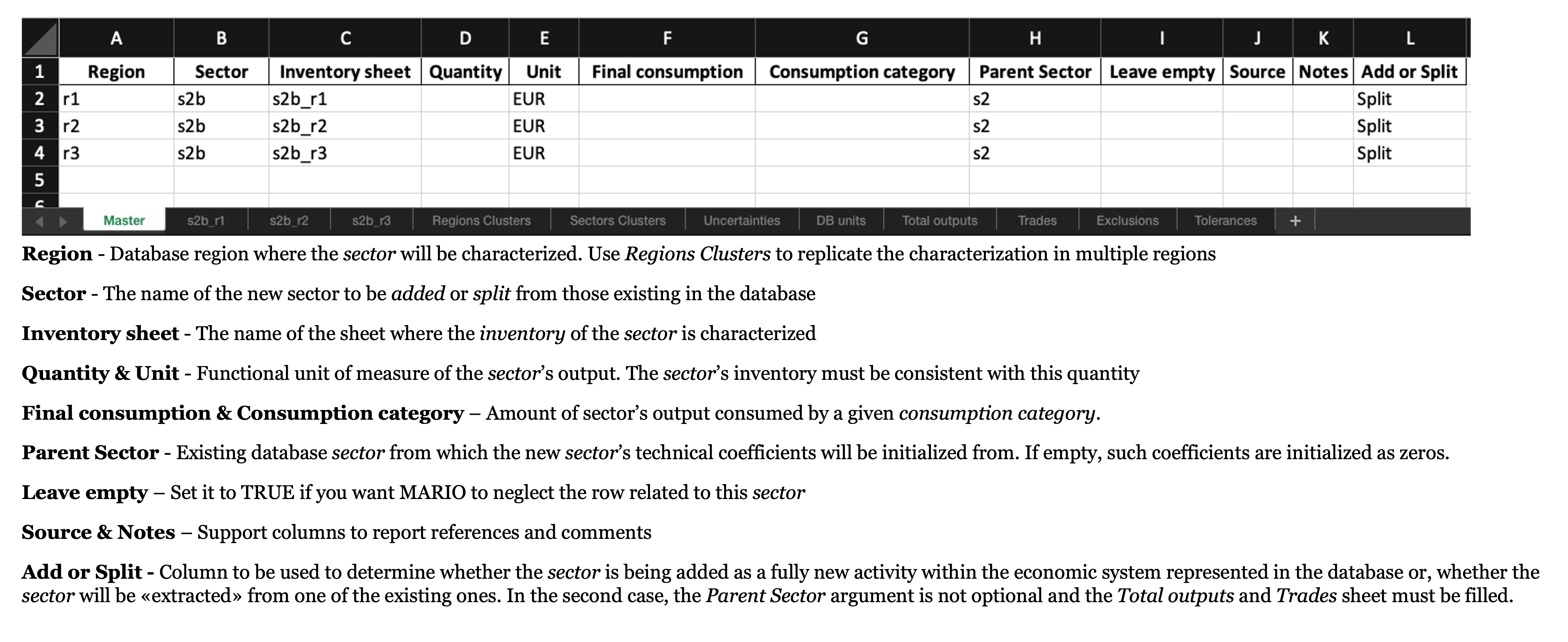
The IOT Master sheet. In a SUT it uses Activity and Commodity, includes Market share and does not expose Add or Split.#
Splitting and solver requirements
The split model uses a nonlinear optimization problem. Large problems may need a suitable external solver such as MOSEK and its licence. Follow the companion notebook for the CVXLab assets, solve and balancing sequence. Inspect feasibility and the resulting balance before using the new sectors.
See db.add_sectors() for validation options, including parent value-added completion and inventory sums.